Campus apps by department
Admissions, orientation, student life, and more — one campus app that works across departments.

Campus apps by department
Admissions, orientation, student life, and more — one campus app that works across departments.
Build unlimited event apps on one license
One partnership for unlimited campus events — orientation, tours, student life, and everything in between.
Build unlimited event apps on one license
One partnership for unlimited campus events — orientation, tours, student life, and everything in between.
Compare event app platforms
See how Guidebook stacks up against other event app and registration platforms.
Compare event app platforms
See how Guidebook stacks up against other event app and registration platforms.
Event apps for nonprofit and community programs
Give members, volunteers, and donors one branded app for conferences, fundraisers, and year-round community.
Event apps for nonprofit and community programs
Give members, volunteers, and donors one branded app for conferences, fundraisers, and year-round community.
Campus integrations and an open API
Connect Guidebook with the campus systems, APIs, and tools your team already uses.
Campus integrations and an open API
Connect Guidebook with the campus systems, APIs, and tools your team already uses.
Event apps for corporate and enterprise teams
Internal meetings, offsites, and large-scale corporate events — with the branding and control enterprise teams need.
Event apps for corporate and enterprise teams
Internal meetings, offsites, and large-scale corporate events — with the branding and control enterprise teams need.
Create a branded event app with no coding
Put schedules, maps, resources, and updates in every attendee's pocket — built for campus events and programs.
Create a branded event app with no coding
Put schedules, maps, resources, and updates in every attendee's pocket — built for campus events and programs.
Launch a branded, white-label event app
A white-label event app with your branding, your content, and your attendee experience — no coding required.
Launch a branded, white-label event app
A white-label event app with your branding, your content, and your attendee experience — no coding required.
Everything in the Guidebook platform
Explore the features event teams use to engage attendees before, during, and after the event.
Everything in the Guidebook platform
Explore the features event teams use to engage attendees before, during, and after the event.
One app for in-person and virtual attendees
The same schedule, networking, and updates whether people are in the room or joining remotely.
One app for in-person and virtual attendees
The same schedule, networking, and updates whether people are in the room or joining remotely.
Event apps built for associations
Annual meetings, chapter events, and member engagement — without rebuilding a new app every year.
Event apps built for associations
Annual meetings, chapter events, and member engagement — without rebuilding a new app every year.
A branded event website that matches the app
Promote the event, collect interest, and keep branding consistent from the first click to check-in.
A branded event website that matches the app
Promote the event, collect interest, and keep branding consistent from the first click to check-in.
Plan, run, and measure events on one platform
App, registration, badges, and websites in one workflow — so planning isn't a pile of disconnected tools.
Plan, run, and measure events on one platform
App, registration, badges, and websites in one workflow — so planning isn't a pile of disconnected tools.
Keep members engaged between events
One branded app for the conference and everything that happens the other 51 weeks of the year.
Keep members engaged between events
One branded app for the conference and everything that happens the other 51 weeks of the year.
The conference app attendees actually use
Schedules, maps, networking, and live updates for annual meetings, summits, and multi-day conferences.
The conference app attendees actually use
Schedules, maps, networking, and live updates for annual meetings, summits, and multi-day conferences.
Registration that feeds your app and badges
Collect registrations, payments, and attendee data in the same platform as your event app.
Registration that feeds your app and badges
Collect registrations, payments, and attendee data in the same platform as your event app.
Design and print event badges in one place
Custom badges, QR check-in, and on-site printing — without a separate badge vendor.
Design and print event badges in one place
Custom badges, QR check-in, and on-site printing — without a separate badge vendor.
A Smaller School?
Deliver a polished, branded event experience without a large team or a big budget.
A Smaller School?
Deliver a polished, branded event experience without a large team or a big budget.
Running Family Programs?
Give families everything they need, from schedules and maps to real-time updates, all in one place.
Running Family Programs?
Give families everything they need, from schedules and maps to real-time updates, all in one place.
Coordinating Move-In Day?
Share updates, manage events, and keep students informed from move-in through the academic year.

Coordinating Move-In Day?
Share updates, manage events, and keep students informed from move-in through the academic year.
Offering Campus Tours?
Deliver branded, self-guided tour experiences with interactive maps and rich media, available 24/7.

Offering Campus Tours?
Deliver branded, self-guided tour experiences with interactive maps and rich media, available 24/7.
Organising a Career Fair?
Simplify logistics for students, employers, and Career Services staff with one easy-to-use app.
Organising a Career Fair?
Simplify logistics for students, employers, and Career Services staff with one easy-to-use app.
Managing Alumni Events?
Plan reunions, regional events, and fundraising campaigns with an app built for alumni engagement.
Managing Alumni Events?
Plan reunions, regional events, and fundraising campaigns with an app built for alumni engagement.
Boost Student Engagement
One hub for schedules, resources, and events that keeps students connected throughout the academic year.
Boost Student Engagement
One hub for schedules, resources, and events that keeps students connected throughout the academic year.
Planning Orientation?
Help new students feel prepared from day one with schedules, campus resources, and real-time updates in one app.
Planning Orientation?
Help new students feel prepared from day one with schedules, campus resources, and real-time updates in one app.
Running Admissions Events?
Manage open houses, tours, and yield events with a branded app that saves time and engages prospective students.

Running Admissions Events?
Manage open houses, tours, and yield events with a branded app that saves time and engages prospective students.
Get a custom Sponsorship Package Template
Stop starting from scratch. Grab free templates that helWe'll build a tailored sponsorship package with suggested pricing, tiers, and benefits..for your specific event.p you build professional sponsorship packages and close deals faster.
Get a custom Sponsorship Package Template
Stop starting from scratch. Grab free templates that helWe'll build a tailored sponsorship package with suggested pricing, tiers, and benefits..for your specific event.p you build professional sponsorship packages and close deals faster.
Plan Your Next Event Without Missing a Beat.
From venue selection to post-event wrap-up, this free checklist walks you through every step (so nothing falls through the cracks).
.avif)
Plan Your Next Event Without Missing a Beat.
From venue selection to post-event wrap-up, this free checklist walks you through every step (so nothing falls through the cracks).
Real Results From Real Events
100,000+ organizations trust Guidebook. See exactly how universities, associations, enterprises, and more put it to work.

Real Results From Real Events
100,000+ organizations trust Guidebook. See exactly how universities, associations, enterprises, and more put it to work.
Flexible pricing for every event size
Find the perfect plan for your needs, from intimate gatherings to large-scale conferences.

Flexible pricing for every event size
Find the perfect plan for your needs, from intimate gatherings to large-scale conferences.
Join our event experts
Watch on-demand webinars and join live sessions with industry leaders sharing best practices for event success.
.avif)
Join our event experts
Watch on-demand webinars and join live sessions with industry leaders sharing best practices for event success.
Guidebook in Action
Book a personalized walkthrough and discover how we help event teams create better attendee experiences.
Guidebook in Action
Book a personalized walkthrough and discover how we help event teams create better attendee experiences.
Your Next Event Needs Its Own War Room





Your Next Event Needs Its Own War Room
As we discuss ways to make events extremely personal and give our attendees true experiences that exceed their expectations, it’s hard not to wonder, “What do the actual logistics of something like that that look like?”
That’s where the concept of The War Room comes into play. That’s right - we’re talking about a central command center where all hell can break loose if it needs to. Just like in the movies.
A War Room might be metaphorical at your next event - the name of your emergency game plan, for instance - but we’re suggesting you’ll want to strongly consider an actual room. Choose somewhere out of the way - a utility closet, a hotel room, a conference room in the next building over - where a team of first-responders can work without the distractions of the event floor.
You’ll also want to make sure you’ve limited access to (and knowledge of) the room itself. This is not the place for the CEO - that will only cause major distractions and may entirely derail the whole operation.
Let’s be clear what we’re creating here. A war room exists at your event for the benefit of your participants. It is solely focused on making sure that the product you’re providing them is seamless, meaningful and tailored to their specific needs. A war room is a nerve center that can immediately and efficiently address the needs of your attendees and/or exhibitors, and it has grown out of an ever-growing expectation that events and meetings will be engaging, dynamic experiences.
Let’s take a look at the type of War Room you might want to set up at your next event.
[caption id="attachment_3000" align="aligncenter" width="512"] The Dr. Strangelove war room.[/caption]
The Social Media Command Center
Your event will be social whether you plan for it or not. The fact of the matter is that people talk about their experiences on social media - all of their experiences. Establishing a Social Media Command Center means that you’ve embraced social and taken a proactive role in guiding the conversation, rather than falling victim to it.
Talk to your participants
Conversation tracking can be done as simply as establishing an event hashtag, to as robustly as using detailed visualization software (such as Buzz Radar). The key, however, is staffing people who are primed to respond no matter the circumstances.
Negative social conversation can alert you to a small problem before they become big problems. For example, your attendees are likely to be the ones to tell you first if it’s too cold in the keynote. People may be discussing confusing traffic patterns or a lack of trash cans - all things that can easily be remedied.
But just as important as tracking the negative is responding to the positive. Liking, commenting on, favoriting and retweeting sentiments from your attendees will create a positive feedback loop and encourage more and more of your attendees to join in on the lovefest - and that’s good for you, your brand and your ROI.
Customize your content
Now here’s where you can really take things to the next level. What if the social conversation was not only acknowledged, but started shaping the content of your event? With your Social Media Command Center in place, you have the ability to start dynamically integrating your attendees’ realtime conversations into the event itself.
Knowing what’s being said means that a mainstage presentation can suddenly become interactive with immediate audience feedback - or that you could actually start shaping content on the fly based on what people want to hear about. Let your attendees vote on a session’s topic, or really live on the edge and leave a blank spot in your speaker schedule to develop a day-of session based on hot topics at the event. A the very least, curate the best of your social shares on a large screen in plain view so that people are inspired to join in.
[caption id="attachment_3001" align="aligncenter" width="591"]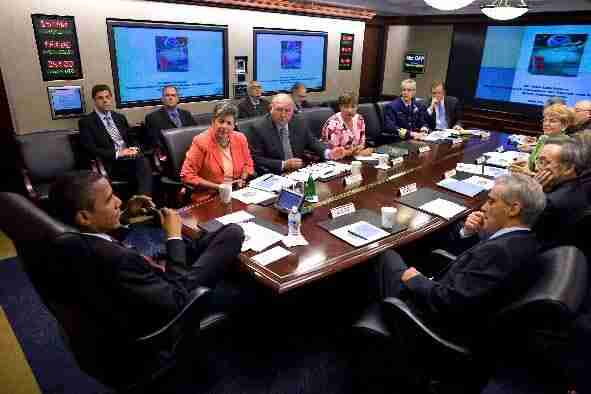 The President's war room.[/caption]
The Crisis Management Center
There are going to be mistakes and mess ups. Let’s all just admit that now and move on with figuring out the best way to handle them.
A Crisis Management Center is the most covert of all the War Rooms. Its existence is known to few, and some of your most trusted people are there to make sure that anything that goes wrong is immediately taken care of in a way that draws little to no attention.A Crisis Management Center will need a direct line of communication with the show floor. (May we suggest the app Voxer?) Once they’ve been linked in to monitoring the most important aspects of the event - time, flow, social, etc. - they should have the authority to make judgement calls as incidents arise.
One of the most powerful responsibilities of the Crisis Management Center will be the ability to actually change the program of your event. It may be as simple as a session time change, but it could be as complex as scheduling a completely new session and alerting attendees of its existence.
For this reason, it’s imperative that the Crisis Management Center have access to updating your event app. By doing so, attendees will always have the most up-to-date information and the team can send push messages as necessary to alert folks of the changes.
[caption id="attachment_3002" align="aligncenter" width="599"]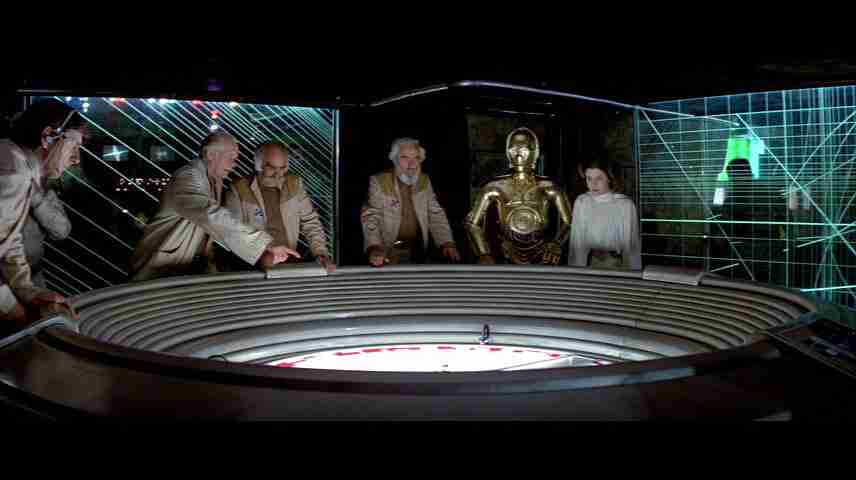 The rebel base war room.[/caption]
The Concierge Center
War Rooms aren’t just for immediate reactions and handling problems - they’re also great for making the experience of your event excellent for everyone involved. A proactive mindset can go a long way towards making sure your participants are receiving the personal, experiential treatment.
Happiness on-demand
One possibility for a Concierge Center would be to create an on-demand service for you exhibitors using your event app. It’s inevitable that someone’s going to forget their charger or need a roll of duct tape. Allow yourself to save the day by being the provider of such things. Create a feedback form within your app where exhibitors can request commonly misplaced or forgotten items.
You could even take a cue from Uber and deliver fun items for a much needed mid-show reprieve. Uber made headlines with its insanely popular kitten delivery and on-demand ice cream. Just imagine the wave of positive feelings that instant chocolate delivery would induce in your exhibitors, all at a relatively low cost to you.
Contests with purpose
Contests are a great way to get people engaging as well. You might try gamifying your event app in order to get people to follow a particular pattern around your show floor. Another option is to gather prizes beforehand that you know you will give away during the event. Then use your Concierge Center to identify certain objectives you would like people to complete and offer prizes for doing so. Use this to bring foot traffic to a dead area or engage with a sponsor that’s not getting enough love. It’s all about flexibility.
Unparalleled experience
The bottom line is that personalized events take resources. It’s going to cost you a little time, money and manpower to pull off any sort of hyper-personal experience. The payoffs in participant happiness and ROI, however, will be well beyond the upfront costs. Consider the War Room structure at your next event and you’ll be looking at unprecedented satisfaction.
Get the Mobile App Playbook
A short guide to running the whole student journey in one app. No fluff, just what works.
for higher ed
Campus
Playbook
A practical guide to building a connected campus experience.
Free playbook
The Mobile App Playbook for Universities
Students decide if they belong long before they set foot on campus. This playbook shows how to win them over from the first visit through graduation.
- Grow enrollment and boost recruitment
- Increase belonging and retention
- Run every event from one branded app
By submitting, you agree to our Privacy Policy.
You're in.
.png)

.avif)