Campus apps by department
Admissions, orientation, student life, and more — one campus app that works across departments.

Campus apps by department
Admissions, orientation, student life, and more — one campus app that works across departments.
Build unlimited event apps on one license
One partnership for unlimited campus events — orientation, tours, student life, and everything in between.
Build unlimited event apps on one license
One partnership for unlimited campus events — orientation, tours, student life, and everything in between.
Compare event app platforms
See how Guidebook stacks up against other event app and registration platforms.
Compare event app platforms
See how Guidebook stacks up against other event app and registration platforms.
Event apps for nonprofit and community programs
Give members, volunteers, and donors one branded app for conferences, fundraisers, and year-round community.
Event apps for nonprofit and community programs
Give members, volunteers, and donors one branded app for conferences, fundraisers, and year-round community.
Campus integrations and an open API
Connect Guidebook with the campus systems, APIs, and tools your team already uses.
Campus integrations and an open API
Connect Guidebook with the campus systems, APIs, and tools your team already uses.
Event apps for corporate and enterprise teams
Internal meetings, offsites, and large-scale corporate events — with the branding and control enterprise teams need.
Event apps for corporate and enterprise teams
Internal meetings, offsites, and large-scale corporate events — with the branding and control enterprise teams need.
Create a branded event app with no coding
Put schedules, maps, resources, and updates in every attendee's pocket — built for campus events and programs.
Create a branded event app with no coding
Put schedules, maps, resources, and updates in every attendee's pocket — built for campus events and programs.
Launch a branded, white-label event app
A white-label event app with your branding, your content, and your attendee experience — no coding required.
Launch a branded, white-label event app
A white-label event app with your branding, your content, and your attendee experience — no coding required.
Everything in the Guidebook platform
Explore the features event teams use to engage attendees before, during, and after the event.
Everything in the Guidebook platform
Explore the features event teams use to engage attendees before, during, and after the event.
One app for in-person and virtual attendees
The same schedule, networking, and updates whether people are in the room or joining remotely.
One app for in-person and virtual attendees
The same schedule, networking, and updates whether people are in the room or joining remotely.
Event apps built for associations
Annual meetings, chapter events, and member engagement — without rebuilding a new app every year.
Event apps built for associations
Annual meetings, chapter events, and member engagement — without rebuilding a new app every year.
A branded event website that matches the app
Promote the event, collect interest, and keep branding consistent from the first click to check-in.
A branded event website that matches the app
Promote the event, collect interest, and keep branding consistent from the first click to check-in.
Plan, run, and measure events on one platform
App, registration, badges, and websites in one workflow — so planning isn't a pile of disconnected tools.
Plan, run, and measure events on one platform
App, registration, badges, and websites in one workflow — so planning isn't a pile of disconnected tools.
Keep members engaged between events
One branded app for the conference and everything that happens the other 51 weeks of the year.
Keep members engaged between events
One branded app for the conference and everything that happens the other 51 weeks of the year.
The conference app attendees actually use
Schedules, maps, networking, and live updates for annual meetings, summits, and multi-day conferences.
The conference app attendees actually use
Schedules, maps, networking, and live updates for annual meetings, summits, and multi-day conferences.
Registration that feeds your app and badges
Collect registrations, payments, and attendee data in the same platform as your event app.
Registration that feeds your app and badges
Collect registrations, payments, and attendee data in the same platform as your event app.
Design and print event badges in one place
Custom badges, QR check-in, and on-site printing — without a separate badge vendor.
Design and print event badges in one place
Custom badges, QR check-in, and on-site printing — without a separate badge vendor.
A Smaller School?
Deliver a polished, branded event experience without a large team or a big budget.

A Smaller School?
Deliver a polished, branded event experience without a large team or a big budget.
Running Family Programs?
Give families everything they need, from schedules and maps to real-time updates, all in one place.

Running Family Programs?
Give families everything they need, from schedules and maps to real-time updates, all in one place.
Coordinating Move-In Day?
Share updates, manage events, and keep students informed from move-in through the academic year.

Coordinating Move-In Day?
Share updates, manage events, and keep students informed from move-in through the academic year.
Offering Campus Tours?
Deliver branded, self-guided tour experiences with interactive maps and rich media, available 24/7.

Offering Campus Tours?
Deliver branded, self-guided tour experiences with interactive maps and rich media, available 24/7.
Organising a Career Fair?
Simplify logistics for students, employers, and Career Services staff with one easy-to-use app.

Organising a Career Fair?
Simplify logistics for students, employers, and Career Services staff with one easy-to-use app.
Managing Alumni Events?
Plan reunions, regional events, and fundraising campaigns with an app built for alumni engagement.

Managing Alumni Events?
Plan reunions, regional events, and fundraising campaigns with an app built for alumni engagement.
Boost Student Engagement
One hub for schedules, resources, and events that keeps students connected throughout the academic year.

Boost Student Engagement
One hub for schedules, resources, and events that keeps students connected throughout the academic year.
Planning Orientation?
Help new students feel prepared from day one with schedules, campus resources, and real-time updates in one app.

Planning Orientation?
Help new students feel prepared from day one with schedules, campus resources, and real-time updates in one app.
Running Admissions Events?
Manage open houses, tours, and yield events with a branded app that saves time and engages prospective students.

Running Admissions Events?
Manage open houses, tours, and yield events with a branded app that saves time and engages prospective students.
Get a custom Sponsorship Package Template
Stop starting from scratch. Grab free templates that helWe'll build a tailored sponsorship package with suggested pricing, tiers, and benefits..for your specific event.p you build professional sponsorship packages and close deals faster.

Get a custom Sponsorship Package Template
Stop starting from scratch. Grab free templates that helWe'll build a tailored sponsorship package with suggested pricing, tiers, and benefits..for your specific event.p you build professional sponsorship packages and close deals faster.
Plan Your Next Event Without Missing a Beat.
From venue selection to post-event wrap-up, this free checklist walks you through every step (so nothing falls through the cracks).
.avif)
Plan Your Next Event Without Missing a Beat.
From venue selection to post-event wrap-up, this free checklist walks you through every step (so nothing falls through the cracks).
Real Results From Real Events
100,000+ organizations trust Guidebook. See exactly how universities, associations, enterprises, and more put it to work.

Real Results From Real Events
100,000+ organizations trust Guidebook. See exactly how universities, associations, enterprises, and more put it to work.
Flexible pricing for every event size
Find the perfect plan for your needs, from intimate gatherings to large-scale conferences.

Flexible pricing for every event size
Find the perfect plan for your needs, from intimate gatherings to large-scale conferences.
Join our event experts
Watch on-demand webinars and join live sessions with industry leaders sharing best practices for event success.
.avif)
Join our event experts
Watch on-demand webinars and join live sessions with industry leaders sharing best practices for event success.
Guidebook in Action
Book a personalized walkthrough and discover how we help event teams create better attendee experiences.
Guidebook in Action
Book a personalized walkthrough and discover how we help event teams create better attendee experiences.
5 Proven Design Tips for Creating a Better Mobile App





5 Proven Design Tips for Creating a Better Mobile App
1. Pay careful attention to the User Experience (UX).
This is especially important when you’re thinking about content placement.First and foremost, you’ll want to think about how to organize the menu (or “drawer”) that houses all your different features.
Think about what your users will care about most. Is it their schedule? The Interact feed? Whichever features you believe are the most important and deserve the most visibility, house those at the top. This will ensure your users see them first every time they open the app. Also, be wary of including too many features in your app. Guidebook’s Builder offers you dozens of different capabilities, but that doesn’t necessarily mean you should try them all out at once. Think about what is most important to your app, and focus on building those features out well.You’ll also want to pay attention to how yourcontent is organized.
For example, there is a large four-day conference, with many concurrent sessions that attendees can choose to attend at any given time. Navigating your master schedule would be overwhelming, but if you plan ahead and create intuitive Schedule Tracks, users are able to filter the schedule down in a much more organized fashion. A great example of this in action is the Renaissance Society of America (RSA). Their calendar is incredibly dense, and usually, when all that information is packed into one place, you’re at risk of overwhelming your users. Through Tracks, users are able to filter all of this content via different categories.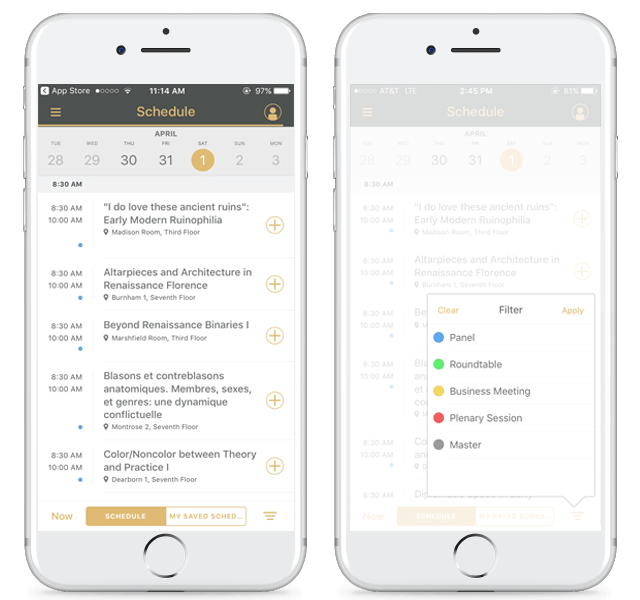 The color coordination creates distinct categories, there are nice contrasting colors, the labels make intuitive sense, and there’s good hierarchy of information. Essentially RSA is able to take something that is inherently risky (having all this information), and organize it in a simple fashion. It results in a really solid user experience.
2. If you’re going Branded, think about all the different elements that you can customize.
Beautiful splash screens, iconography, a properly branded theme, right-sized photography, banner ad design, and consistency throughout. Tip:Take advantage of the brand assets you already have access to. Any resources your organization has already created for your brand, like graphics and small images (that may double as icons), can be utilized in your app.3. Don’t choose the colors you like best; choose the colors that match your brand.
This one may seem obvious, but time and time again we see instances where apps have color schemes that don’t match the organization’s actual branding. If you are in charge of creating an app for your org, remember that in most cases, your organization has a set of brand guidelines to abide by -- even if you don’t know about them off the top of your head. Ask around before you finalize your theming! Now again this doesn’t apply to you if you’re an individual building an app for a more personal use like a wedding or travel app. But chances are, if you’re opting for the Branded plan, you’re part of an organization that has resources to allocate toward a mobile initiative.4. For event apps: Think about the role your app plays in the larger context of the overall attendee experience, rather than just as an event app.
This one isn’t a necessity, but it’s definitely something that helps an app stand out from the crowd. Take, for example, ChefConf 2017. It’s an event where over 2,000 members of the DevOps community gather in Austin, Texas for three days of engaging community events, keynote sessions, workshops and more. A perfect example of when an event app shines, you may be thinking. And you’re correct, it is! But one thing that really makes their app special is the fact they zoomed out and took a view of the event from 10,000 feet. The app creator paid special attention to the fact that their event attendees were flooding into Austin from all over the world, and most likely only a portion of them had ever been to Austin before. So on top of the event app itself, they added a sort of “travel guide” that served these attendees before and after the event’s show hours, too. They gave an inside scoop on great places to eat, bars to network at, sights to see, and more.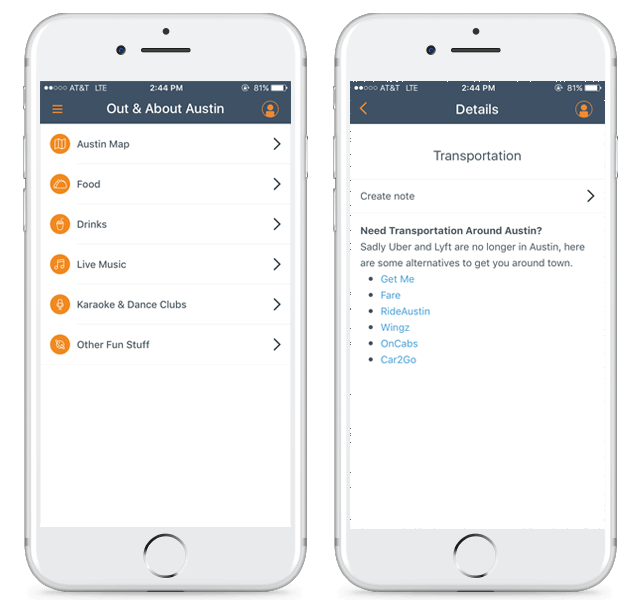 Not only that, but they also included a section specifically to remind users that most ridesharing services that we’re accustomed to are actually banned in Austin, and they provided alternate suggestions that most people wouldn’t know about. (This could also be an opportunity to generate some extra revenue, if they teamed up with these services and negotiated some referral deal!) So even things that travelers might not even think about when visiting Austin, the app creators preemptively thought about and built it into the ChefConf app. Brilliant.
5. Don’t forget about the social feed!
If you’re unfamiliar with what the interactive feed feature is (or Interact, if you do use Guidebook) it’s essentially a one-stop shop for aggregating all the most popular content within your app, in one centralized spot. Whether it’s an upcoming Schedule Session that you may be interested, a keynote speaker that everyone is raving about, a sponsor card, or a whole slew of other possibilities, the Interact feed delivers content to your users in a smart way. Learning algorithms get a sense of what individual users are interested in, and display content that it thinks are a good match for that person. Users can easily share their thoughts insights with others, and you don’t have to worry about placing content in the perfect spot within your app. Just do your best; Interact will help. You can read more about Interact here.
Get the Mobile App Playbook
A short guide to running the whole student journey in one app. No fluff, just what works.
for higher ed
Campus
Playbook
A practical guide to building a connected campus experience.
Free playbook
The Mobile App Playbook for Universities
Students decide if they belong long before they set foot on campus. This playbook shows how to win them over from the first visit through graduation.
- Grow enrollment and boost recruitment
- Increase belonging and retention
- Run every event from one branded app
By submitting, you agree to our Privacy Policy.
You're in.
.png)

%20(1).avif)
.avif)