
Works with screen readers
Works with the screen reader on every phone, and follows Apple and Google's guidelines, so students who navigate by voice or touch aren't left out.

A product that moves. Regular improvements driven by what campus teams need.
Latest features and improvements - small updates that make a big impact.
What's live and what's next in Guidebook's growing Slate integration, connecting event engagement to enrollment data.
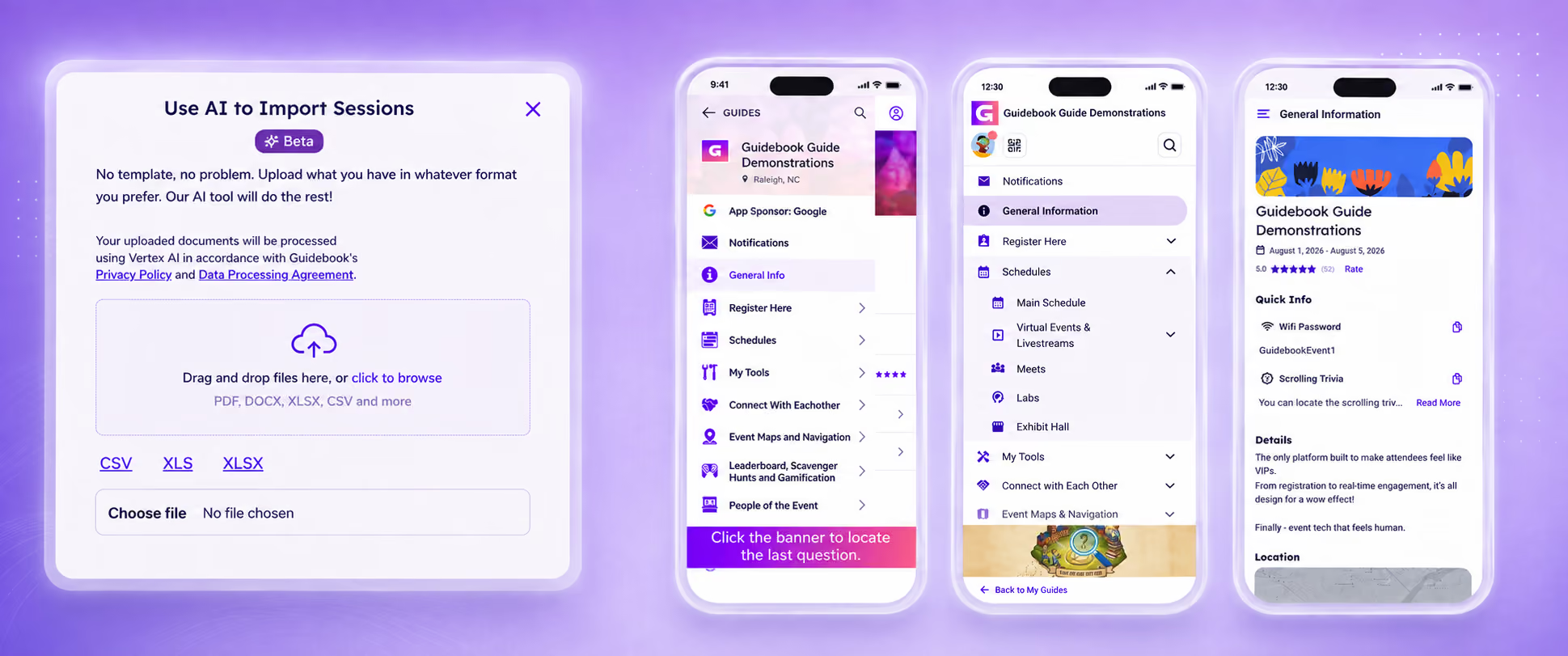
Manage your schedule faster with AI — import it in various formats, and let AI handle fitting it to the template.
Guidebook's registration platform now supports multiple question types on registration forms.
Create professional, customized, print-at-home badges in minutes for security, check-in, and networking.
Guidebook's registration platform now supports paid events — multiple ticket types, custom forms, and Stripe payments.
Users can now include a message when connecting with fellow attendees, making outreach more personal.
Guidebook's new Registration tool manages event registration in one place — tickets, website design, and more.
Organizers can now track overall guide attendance, in addition to individual session attendance.
The updated app design helps users find guides faster, with custom Branded configuration available for eligible clients.
Promote your event with Guidebook's new Event Marketing Website — an eye-catching, informative page for attendees.
Review user behavior, text posts, and photo uploads in one place with the updated Moderation dashboard.
Customize Guidebook ID Badges with additional info alongside a user's name and QR code.
More guide content is now available on Guidebook Web, including Folders, Schedule Tracks, and Pinned features.
Drive app adoption and engagement with the Leaderboard — set point values for actions, and let end-users compete for the top spot.
Speakers, sponsors, and other collaborators can now add videos and links — including website URLs and PDFs — to their own page.
Sync session, custom list, and attendee data into your guide straight from a Google Sheet via Zapier.
New form question types — Date, Time, Photo Upload, Video Upload, and Email Request — make data collection more flexible.
Users can now search PDFs in your guide, in addition to schedule sessions and custom list items.
Numerous accessibility and quality-of-life improvements across our native app and web platforms.
Configure and export QR Pages for instant access to information — attendees just scan with their device camera.
Assign Custom Lists to specific users for secure, personalized experiences within one guide.
Builders can lock or unlock the guide's time zone; locked by default, so dates display consistently for all attendees.
Assessments mode lets builders design more robust forms, designate correct answers, and automatically score responses.
Form submissions can now email designated recipients, set at the form level or per question.
Guide-builders can now also sync Speakers and Exhibitors from Cvent, in addition to Attendees and Sessions.
Sync Attendees and Schedule Sessions, including Tracks, between Cvent and Guidebook.
Users can now complete surveys on Guidebook Web, so you can capture feedback regardless of how they access your guide.
Builders can add a Calendly or HubSpot Meeting Scheduler URL to custom list items, prompting users to book an appointment.
Builders can deliver more engaging content on Guidebook Web by including videos in custom lists.
Users can view a list of users, view profiles, and manage connection requests on Guidebook Web.
Builders can add a Contact form to custom list items, inviting users to reach out instantly.
Guides located near an end-user are now highlighted in a section of their space dashboard.
YouTube, Vimeo, and Twitch videos can now be played from inside a session on mobile.
Zoom meetings and webinars are now optimized for use in Guidebook Web.
Users can now update their profiles directly on Guidebook Web.
Live polls are now accessible on Guidebook Web, from within their assigned session.
During onboarding, users can select from a list of Interests set up by the guide-building team.
Session discussion is now available on Guidebook Web, and separated from the Interact feed on mobile for session-specific conversations.
Each session now supports video links — YouTube, Vimeo, and Twitch are all supported.
Audio tours now support taking tours remotely and viewing a full list of tour stops.
Guidebook Web pages now follow the privacy setting of your guide.
Users can create meetings with up to fifteen other guide users, including a link to a virtual meeting.
Rebuilt survey tools make it easier for organizers to create surveys, export results, and give attendees a smooth experience.
Scan a QR code to check attendees into a session, then view or export who attended.
Guidebook ID lets users connect by scanning another user's unique QR code to share profile information.
Quick Info surfaces key details — like Wi-Fi passwords — at the top of sessions, custom list items, or general info.
Cover Pages offer a personalized form of promotional material designed to increase guide adoption among attendees.
Feedback on last year's Discover App Home update shaped this refreshed Home layout.
The Privacy Center lets users control whether they share their guide usage data. Guidebook is GDPR compliant.
Our Open API uses resource-oriented URLs, standard HTTP response codes, and HTTP verbs, intended for content management.
Out-of-the-box integrations — including Eventbrite, Aventri, and Salesforce — make managing event content even easier.
View the engagement levels and in-app actions of your users, then use that data for strategic outreach.
Manage users for a better onboarding experience — increase adoption, control access, and gain more insight into your audience.
Manage your guide from your phone — update schedule items and send messages, all from the Guidebook app.
Sort and manage your guides using tags, so a busy dashboard stays easy to navigate.
See at a glance what changes collaborators have made to your guides, and quickly navigate to specific sections.
A curated feed of relevant content and discussions that increases engagement among organizers, sponsors, and attendees.
Lets users log into Guidebook-powered apps using their existing company or organization credentials.
Send targeted push notifications to specific groups instead of everyone at your event.
Create your own icons using our preset library, then adjust the colors to match your brand or event.
Invite speakers and sponsors to fill in their own guide listing — bio, photo, contact details, and more.
Lets a guide admin preset attendees' schedules, which attendees see after downloading the app and signing in.
Use one custom list item across several lists in Builder, instead of recreating it each time.
Create self-guided mobile tours for your campus or venue, built entirely in Builder.
Event organizers can now track attendance on any session in their guide, and set attendance limits.
Users can message each other within a guide — create an account, check in, and message anyone else who's checked in.
The Metrics page in Gears shows detailed insights on your guide's use, including download numbers by platform and menu item activity.
Allows ranking and re-ordering of concurrent sessions.
Engage speakers and attendees with real-time live polling (requires a strong internet connection).
Guide builders can base a new guide on an existing one — guide cloning makes duplicating a guide straightforward.
Mass photo uploading for custom lists lets Gears users add multiple photos to list items in one go.
Lets users take in-app notes and share them with others.
Boost networking and engagement by adding the Attendees module, so attendees can create profiles and connect with each other.
Keep attendees up to date by sending real-time or scheduled inbox and push notifications to your users.
Make simple image maps interactive by adding clickable locations, then link them to sessions or custom list items.
Quarterly summaries of updates, highlights, and best practices.
Accessibility isn't an add-on. Guidebook is built so every student can find their way, read their schedule, and stay connected, whatever tools they rely on to use their phone.