Campus apps by department
Admissions, orientation, student life, and more — one campus app that works across departments.

Campus apps by department
Admissions, orientation, student life, and more — one campus app that works across departments.
Build unlimited event apps on one license
One partnership for unlimited campus events — orientation, tours, student life, and everything in between.
Build unlimited event apps on one license
One partnership for unlimited campus events — orientation, tours, student life, and everything in between.
Compare event app platforms
See how Guidebook stacks up against other event app and registration platforms.
Compare event app platforms
See how Guidebook stacks up against other event app and registration platforms.
Event apps for nonprofit and community programs
Give members, volunteers, and donors one branded app for conferences, fundraisers, and year-round community.
Event apps for nonprofit and community programs
Give members, volunteers, and donors one branded app for conferences, fundraisers, and year-round community.
Campus integrations and an open API
Connect Guidebook with the campus systems, APIs, and tools your team already uses.
Campus integrations and an open API
Connect Guidebook with the campus systems, APIs, and tools your team already uses.
Event apps for corporate and enterprise teams
Internal meetings, offsites, and large-scale corporate events — with the branding and control enterprise teams need.
Event apps for corporate and enterprise teams
Internal meetings, offsites, and large-scale corporate events — with the branding and control enterprise teams need.
Create a branded event app with no coding
Put schedules, maps, resources, and updates in every attendee's pocket — built for campus events and programs.
Create a branded event app with no coding
Put schedules, maps, resources, and updates in every attendee's pocket — built for campus events and programs.
Launch a branded, white-label event app
A white-label event app with your branding, your content, and your attendee experience — no coding required.
Launch a branded, white-label event app
A white-label event app with your branding, your content, and your attendee experience — no coding required.
Everything in the Guidebook platform
Explore the features event teams use to engage attendees before, during, and after the event.
Everything in the Guidebook platform
Explore the features event teams use to engage attendees before, during, and after the event.
One app for in-person and virtual attendees
The same schedule, networking, and updates whether people are in the room or joining remotely.
One app for in-person and virtual attendees
The same schedule, networking, and updates whether people are in the room or joining remotely.
Event apps built for associations
Annual meetings, chapter events, and member engagement — without rebuilding a new app every year.
Event apps built for associations
Annual meetings, chapter events, and member engagement — without rebuilding a new app every year.
A branded event website that matches the app
Promote the event, collect interest, and keep branding consistent from the first click to check-in.
A branded event website that matches the app
Promote the event, collect interest, and keep branding consistent from the first click to check-in.
Plan, run, and measure events on one platform
App, registration, badges, and websites in one workflow — so planning isn't a pile of disconnected tools.
Plan, run, and measure events on one platform
App, registration, badges, and websites in one workflow — so planning isn't a pile of disconnected tools.
Keep members engaged between events
One branded app for the conference and everything that happens the other 51 weeks of the year.
Keep members engaged between events
One branded app for the conference and everything that happens the other 51 weeks of the year.
The conference app attendees actually use
Schedules, maps, networking, and live updates for annual meetings, summits, and multi-day conferences.
The conference app attendees actually use
Schedules, maps, networking, and live updates for annual meetings, summits, and multi-day conferences.
Registration that feeds your app and badges
Collect registrations, payments, and attendee data in the same platform as your event app.
Registration that feeds your app and badges
Collect registrations, payments, and attendee data in the same platform as your event app.
Design and print event badges in one place
Custom badges, QR check-in, and on-site printing — without a separate badge vendor.
Design and print event badges in one place
Custom badges, QR check-in, and on-site printing — without a separate badge vendor.
A Smaller School?
Deliver a polished, branded event experience without a large team or a big budget.
A Smaller School?
Deliver a polished, branded event experience without a large team or a big budget.
Running Family Programs?
Give families everything they need, from schedules and maps to real-time updates, all in one place.
Running Family Programs?
Give families everything they need, from schedules and maps to real-time updates, all in one place.
Coordinating Move-In Day?
Share updates, manage events, and keep students informed from move-in through the academic year.

Coordinating Move-In Day?
Share updates, manage events, and keep students informed from move-in through the academic year.
Offering Campus Tours?
Deliver branded, self-guided tour experiences with interactive maps and rich media, available 24/7.

Offering Campus Tours?
Deliver branded, self-guided tour experiences with interactive maps and rich media, available 24/7.
Organising a Career Fair?
Simplify logistics for students, employers, and Career Services staff with one easy-to-use app.
Organising a Career Fair?
Simplify logistics for students, employers, and Career Services staff with one easy-to-use app.
Managing Alumni Events?
Plan reunions, regional events, and fundraising campaigns with an app built for alumni engagement.
Managing Alumni Events?
Plan reunions, regional events, and fundraising campaigns with an app built for alumni engagement.
Boost Student Engagement
One hub for schedules, resources, and events that keeps students connected throughout the academic year.
Boost Student Engagement
One hub for schedules, resources, and events that keeps students connected throughout the academic year.
Planning Orientation?
Help new students feel prepared from day one with schedules, campus resources, and real-time updates in one app.
Planning Orientation?
Help new students feel prepared from day one with schedules, campus resources, and real-time updates in one app.
Running Admissions Events?
Manage open houses, tours, and yield events with a branded app that saves time and engages prospective students.

Running Admissions Events?
Manage open houses, tours, and yield events with a branded app that saves time and engages prospective students.
Get a custom Sponsorship Package Template
Stop starting from scratch. Grab free templates that helWe'll build a tailored sponsorship package with suggested pricing, tiers, and benefits..for your specific event.p you build professional sponsorship packages and close deals faster.
Get a custom Sponsorship Package Template
Stop starting from scratch. Grab free templates that helWe'll build a tailored sponsorship package with suggested pricing, tiers, and benefits..for your specific event.p you build professional sponsorship packages and close deals faster.
Plan Your Next Event Without Missing a Beat.
From venue selection to post-event wrap-up, this free checklist walks you through every step (so nothing falls through the cracks).
.avif)
Plan Your Next Event Without Missing a Beat.
From venue selection to post-event wrap-up, this free checklist walks you through every step (so nothing falls through the cracks).
Real Results From Real Events
100,000+ organizations trust Guidebook. See exactly how universities, associations, enterprises, and more put it to work.

Real Results From Real Events
100,000+ organizations trust Guidebook. See exactly how universities, associations, enterprises, and more put it to work.
Flexible pricing for every event size
Find the perfect plan for your needs, from intimate gatherings to large-scale conferences.

Flexible pricing for every event size
Find the perfect plan for your needs, from intimate gatherings to large-scale conferences.
Join our event experts
Watch on-demand webinars and join live sessions with industry leaders sharing best practices for event success.
.avif)
Join our event experts
Watch on-demand webinars and join live sessions with industry leaders sharing best practices for event success.
Guidebook in Action
Book a personalized walkthrough and discover how we help event teams create better attendee experiences.
Guidebook in Action
Book a personalized walkthrough and discover how we help event teams create better attendee experiences.
How Guidebook Uses Guidebook for Remote Work





How Guidebook Uses Guidebook for Remote Work
In the wake of the pandemic, many companies around the globe have shifted to remote work. Large companies such as Google, Facebook, and Twitter were some of the first to make this switch, with many companies following suit after The Centers for Disease Control (CDC) published a recommendation that businesses should allow their employees to work remotely as much as possible.
But even before the pandemic, Forbes reported that remote work was the “standard operating mode for at least 50% of the U.S. population." In the last year, remote work quickly became one of the most desirable benefits an employer could offer. The freedom for employees to work in a non-traditional work setting with more flexible hours gave increased motivation for people to seek remote roles, especially employees just joining the workforce.
In fact, since 2005, the number of people who work from home has increased by 140% due to advances in technology. With the rising popularity of a remote work culture, an increasing amount of employers are establishing remote work policies. It’s too soon to tell how long the novel coronavirus outbreak will continue to impact day-to-day operations, but the reality is that remote work is here to stay, which is why it’s critical for businesses to embrace it and create the best and most productive work environment possible.
Now, more than ever, it is important to set proper expectations and guidelines for working remotely. Many employees will be working remotely for an extended period for the first time and don’t know what is expected of them, so guidance is key to ensure they are successful. Employers must make it very clear what standards they expect when it comes to how employees should be engaging with each other, in what capacity employees should be available, and in addressing questions employees may ask.
With Guidebook employees located around the globe in North America, South America, Europe, and Asia, communication and access to company information is a vital part of continuity for our business.
In order to support remote work, Guidebook uses its own platform to engage with employees, communicate changes in a timely manner, and provide relevant information.
A mobile app helps us connect with employees, regardless of whether or not they are working remotely, and provides us with the opportunity to reach employees where they already are -- on their phones.

We communicate instant news through push notifications. Last week, Guidebook’s CEO, Jeff Lewis, sent a push notification to the whole company and announced that effective this week, Guidebook would be implementing a mandatory work-from-home period for employees. And, as more information came in from the county, employees continued to receive notifications regarding important news.
As push notifications for Guidebook’s remote work app are enabled for every employee, this message was received by everyone in the company in real-time... even employees who normally use their email to receive information! The combination of push notifications to email and chat communications increases the likelihood that an employee will receive the information faster.
This is the power of mobile: the ability to reach a widespread audience at any time, anywhere.

We set expectations for our employees for what they should expect during this extended remote work period. Guidebook’s remote work app covers a broad range of topics regarding work-from-home (WFH) best practices, including tips on how to stick to a schedule, over-communicating, being responsive, and how to deal with IT questions.
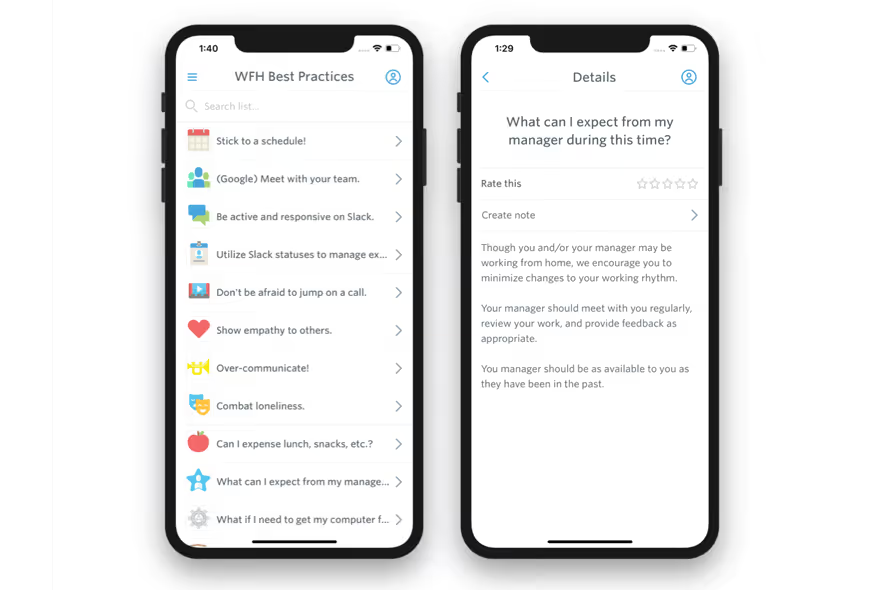
We encourage engagement and create an environment in which people will not feel isolated. Similar to social media platforms, Guidebook uses its in-house Interact feature to make sure employees feel connected with each other. From silly stories to recommendation requests to personal photos of desk setups (or pets), Guidebook employees treat this interactive social feed as a place for employees to engage with others.

We keep employees in the loop with general updates. Decreased amount of face-time in the office means that employees may feel cut off from their peers or information they need in order to do their jobs well. Guidebook not only messages employees about important information (like the push notifications about the work-from-home mandate), but also by sending messages about general information to employees via the messages feature in the app.
This ensures that all information that employees need to know about working remotely is found in the app designed for remote work -- no need to search through countless emails!

Interested in using mobile to improve your remote work culture? Start building your own app now!

Get the Mobile App Playbook
A short guide to running the whole student journey in one app. No fluff, just what works.
for higher ed
Campus
Playbook
A practical guide to building a connected campus experience.
Free playbook
The Mobile App Playbook for Universities
Students decide if they belong long before they set foot on campus. This playbook shows how to win them over from the first visit through graduation.
- Grow enrollment and boost recruitment
- Increase belonging and retention
- Run every event from one branded app
By submitting, you agree to our Privacy Policy.
You're in.
.png)



.avif)