Campus apps by department
Admissions, orientation, student life, and more — one campus app that works across departments.

Campus apps by department
Admissions, orientation, student life, and more — one campus app that works across departments.
Build unlimited event apps on one license
One partnership for unlimited campus events — orientation, tours, student life, and everything in between.
Build unlimited event apps on one license
One partnership for unlimited campus events — orientation, tours, student life, and everything in between.
Compare event app platforms
See how Guidebook stacks up against other event app and registration platforms.
Compare event app platforms
See how Guidebook stacks up against other event app and registration platforms.
Event apps for nonprofit and community programs
Give members, volunteers, and donors one branded app for conferences, fundraisers, and year-round community.
Event apps for nonprofit and community programs
Give members, volunteers, and donors one branded app for conferences, fundraisers, and year-round community.
Campus integrations and an open API
Connect Guidebook with the campus systems, APIs, and tools your team already uses.
Campus integrations and an open API
Connect Guidebook with the campus systems, APIs, and tools your team already uses.
Event apps for corporate and enterprise teams
Internal meetings, offsites, and large-scale corporate events — with the branding and control enterprise teams need.
Event apps for corporate and enterprise teams
Internal meetings, offsites, and large-scale corporate events — with the branding and control enterprise teams need.
Create a branded event app with no coding
Put schedules, maps, resources, and updates in every attendee's pocket — built for campus events and programs.
Create a branded event app with no coding
Put schedules, maps, resources, and updates in every attendee's pocket — built for campus events and programs.
Launch a branded, white-label event app
A white-label event app with your branding, your content, and your attendee experience — no coding required.
Launch a branded, white-label event app
A white-label event app with your branding, your content, and your attendee experience — no coding required.
Everything in the Guidebook platform
Explore the features event teams use to engage attendees before, during, and after the event.
Everything in the Guidebook platform
Explore the features event teams use to engage attendees before, during, and after the event.
One app for in-person and virtual attendees
The same schedule, networking, and updates whether people are in the room or joining remotely.
One app for in-person and virtual attendees
The same schedule, networking, and updates whether people are in the room or joining remotely.
Event apps built for associations
Annual meetings, chapter events, and member engagement — without rebuilding a new app every year.
Event apps built for associations
Annual meetings, chapter events, and member engagement — without rebuilding a new app every year.
A branded event website that matches the app
Promote the event, collect interest, and keep branding consistent from the first click to check-in.
A branded event website that matches the app
Promote the event, collect interest, and keep branding consistent from the first click to check-in.
Plan, run, and measure events on one platform
App, registration, badges, and websites in one workflow — so planning isn't a pile of disconnected tools.
Plan, run, and measure events on one platform
App, registration, badges, and websites in one workflow — so planning isn't a pile of disconnected tools.
Keep members engaged between events
One branded app for the conference and everything that happens the other 51 weeks of the year.
Keep members engaged between events
One branded app for the conference and everything that happens the other 51 weeks of the year.
The conference app attendees actually use
Schedules, maps, networking, and live updates for annual meetings, summits, and multi-day conferences.
The conference app attendees actually use
Schedules, maps, networking, and live updates for annual meetings, summits, and multi-day conferences.
Registration that feeds your app and badges
Collect registrations, payments, and attendee data in the same platform as your event app.
Registration that feeds your app and badges
Collect registrations, payments, and attendee data in the same platform as your event app.
Design and print event badges in one place
Custom badges, QR check-in, and on-site printing — without a separate badge vendor.
Design and print event badges in one place
Custom badges, QR check-in, and on-site printing — without a separate badge vendor.
A Smaller School?
Deliver a polished, branded event experience without a large team or a big budget.

A Smaller School?
Deliver a polished, branded event experience without a large team or a big budget.
Running Family Programs?
Give families everything they need, from schedules and maps to real-time updates, all in one place.

Running Family Programs?
Give families everything they need, from schedules and maps to real-time updates, all in one place.
Coordinating Move-In Day?
Share updates, manage events, and keep students informed from move-in through the academic year.

Coordinating Move-In Day?
Share updates, manage events, and keep students informed from move-in through the academic year.
Offering Campus Tours?
Deliver branded, self-guided tour experiences with interactive maps and rich media, available 24/7.

Offering Campus Tours?
Deliver branded, self-guided tour experiences with interactive maps and rich media, available 24/7.
Organising a Career Fair?
Simplify logistics for students, employers, and Career Services staff with one easy-to-use app.

Organising a Career Fair?
Simplify logistics for students, employers, and Career Services staff with one easy-to-use app.
Managing Alumni Events?
Plan reunions, regional events, and fundraising campaigns with an app built for alumni engagement.

Managing Alumni Events?
Plan reunions, regional events, and fundraising campaigns with an app built for alumni engagement.
Boost Student Engagement
One hub for schedules, resources, and events that keeps students connected throughout the academic year.

Boost Student Engagement
One hub for schedules, resources, and events that keeps students connected throughout the academic year.
Planning Orientation?
Help new students feel prepared from day one with schedules, campus resources, and real-time updates in one app.

Planning Orientation?
Help new students feel prepared from day one with schedules, campus resources, and real-time updates in one app.
Running Admissions Events?
Manage open houses, tours, and yield events with a branded app that saves time and engages prospective students.

Running Admissions Events?
Manage open houses, tours, and yield events with a branded app that saves time and engages prospective students.
Get a custom Sponsorship Package Template
Stop starting from scratch. Grab free templates that helWe'll build a tailored sponsorship package with suggested pricing, tiers, and benefits..for your specific event.p you build professional sponsorship packages and close deals faster.

Get a custom Sponsorship Package Template
Stop starting from scratch. Grab free templates that helWe'll build a tailored sponsorship package with suggested pricing, tiers, and benefits..for your specific event.p you build professional sponsorship packages and close deals faster.
Plan Your Next Event Without Missing a Beat.
From venue selection to post-event wrap-up, this free checklist walks you through every step (so nothing falls through the cracks).
.avif)
Plan Your Next Event Without Missing a Beat.
From venue selection to post-event wrap-up, this free checklist walks you through every step (so nothing falls through the cracks).
Real Results From Real Events
100,000+ organizations trust Guidebook. See exactly how universities, associations, enterprises, and more put it to work.

Real Results From Real Events
100,000+ organizations trust Guidebook. See exactly how universities, associations, enterprises, and more put it to work.
Flexible pricing for every event size
Find the perfect plan for your needs, from intimate gatherings to large-scale conferences.

Flexible pricing for every event size
Find the perfect plan for your needs, from intimate gatherings to large-scale conferences.
Join our event experts
Watch on-demand webinars and join live sessions with industry leaders sharing best practices for event success.
.avif)
Join our event experts
Watch on-demand webinars and join live sessions with industry leaders sharing best practices for event success.
Guidebook in Action
Book a personalized walkthrough and discover how we help event teams create better attendee experiences.
Guidebook in Action
Book a personalized walkthrough and discover how we help event teams create better attendee experiences.
The Guidebook App Is Getting a Refresh. Here's What That Means for You and Attendees.
.avif)




The Guidebook App Is Getting a Refresh. Here's What That Means for You and Attendees.
Today, we're officially kicking off the Guidebook 2026 App Refresh! This is the first in a series of 10 planned updates to the Guidebook mobile experience (iOS and Android) that will roll out over the coming months.
The goal is simple. Make Guidebook:
- Faster to navigate.
- Easier on the eyes.
- More intuitive for the attendees who rely on it at your events.
The first set of updates is now live in Builder! Here's everything you need to know.
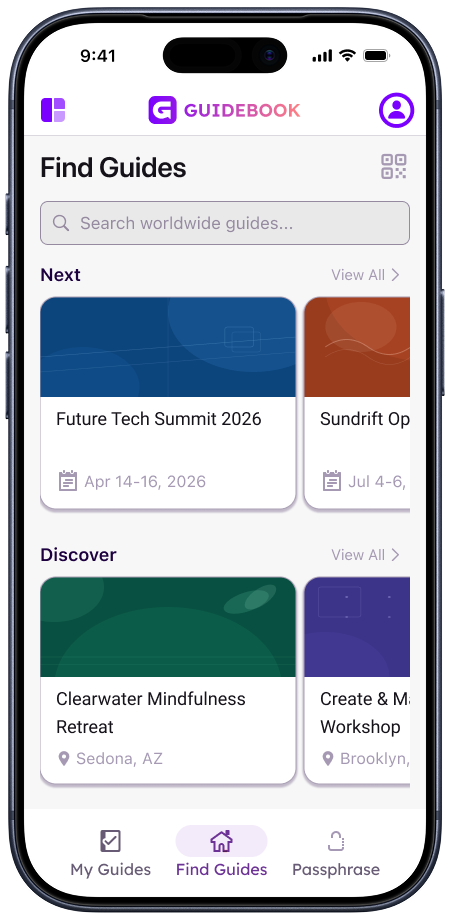
Updated Space Home on Phone
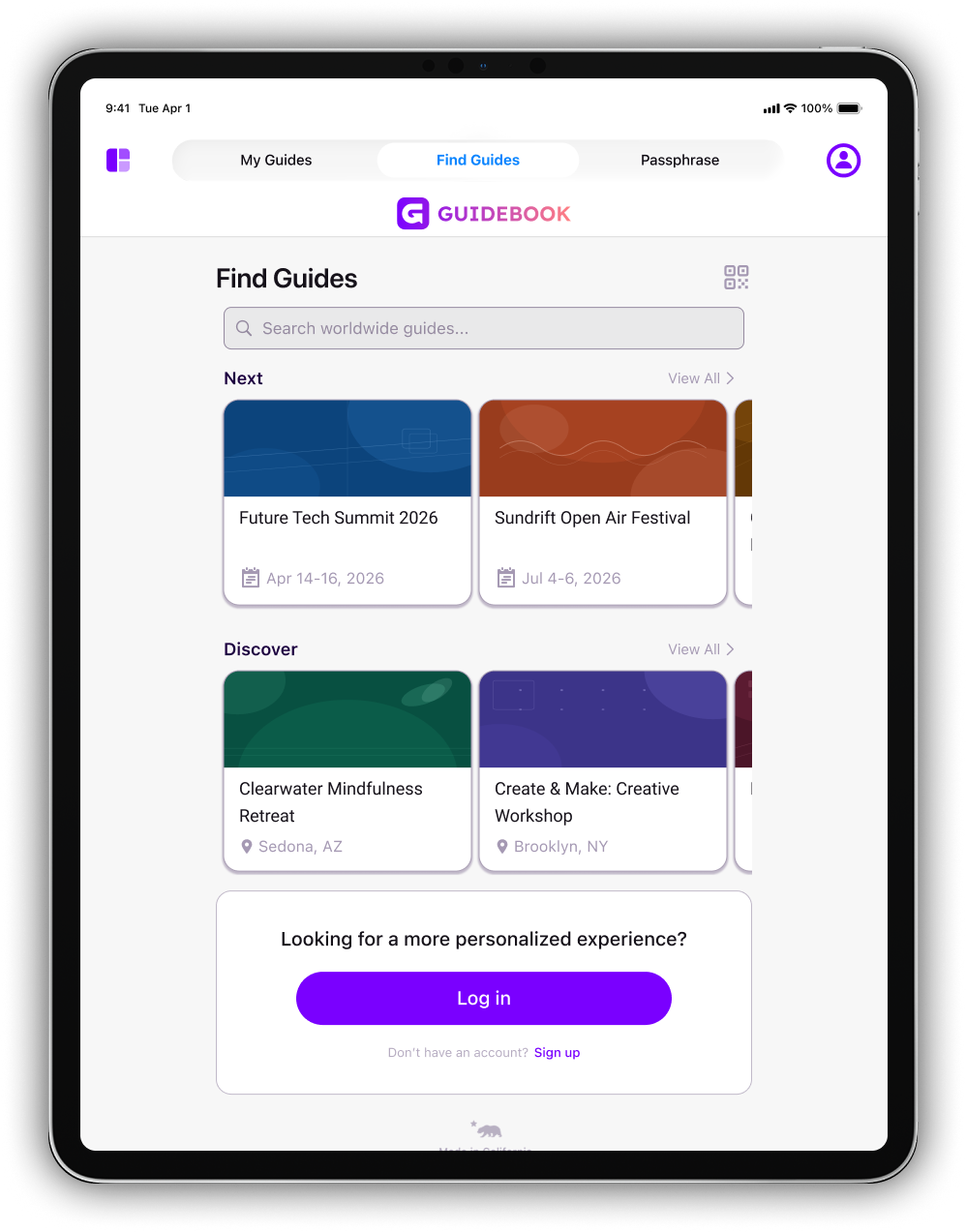
Updated Space Home on Tablet
Why We're Doing This
Guidebook rebranded in November 2025, unveiling a new visual identity that reflected who we are today and where we're headed.
But a rebrand doesn't stop at a new logo. It has to show up in the product, too.
At the same time, we've been listening to feedback from customers and prospects throughout the year who felt that the app's look and feel needed to evolve.
The feedback pointed to a consistent theme: the app wasn't keeping pace with the rest of the market visually.
We took that feedback seriously, and rather than make excuses for it, we decided to do something about it.
The 2026 App Refresh is our answer. It's not a single sweeping overhaul; it's a thoughtful, iterative process that lets us improve the experience steadily without disrupting your events.
What We're Focused On
Across all 10 iterations, the work comes down to three guiding principles:
1. Maximize screen real-estate: Every pixel should be earning its place. We're removing visual clutter so the content your attendees need is front and center.
2. Remove what's superfluous: Unnecessary icons, boxes, and outlines add noise without adding value. We're stripping those away to create a cleaner, more modern feel.
3. Modernize user flows. Navigation should feel natural. So we're refining how attendees move through the app, allowing them to find what they need faster, with less friction.
What's New in Builder
This first iteration of this refresh touches several core screens in the Guidebook experience.
Find a Guide
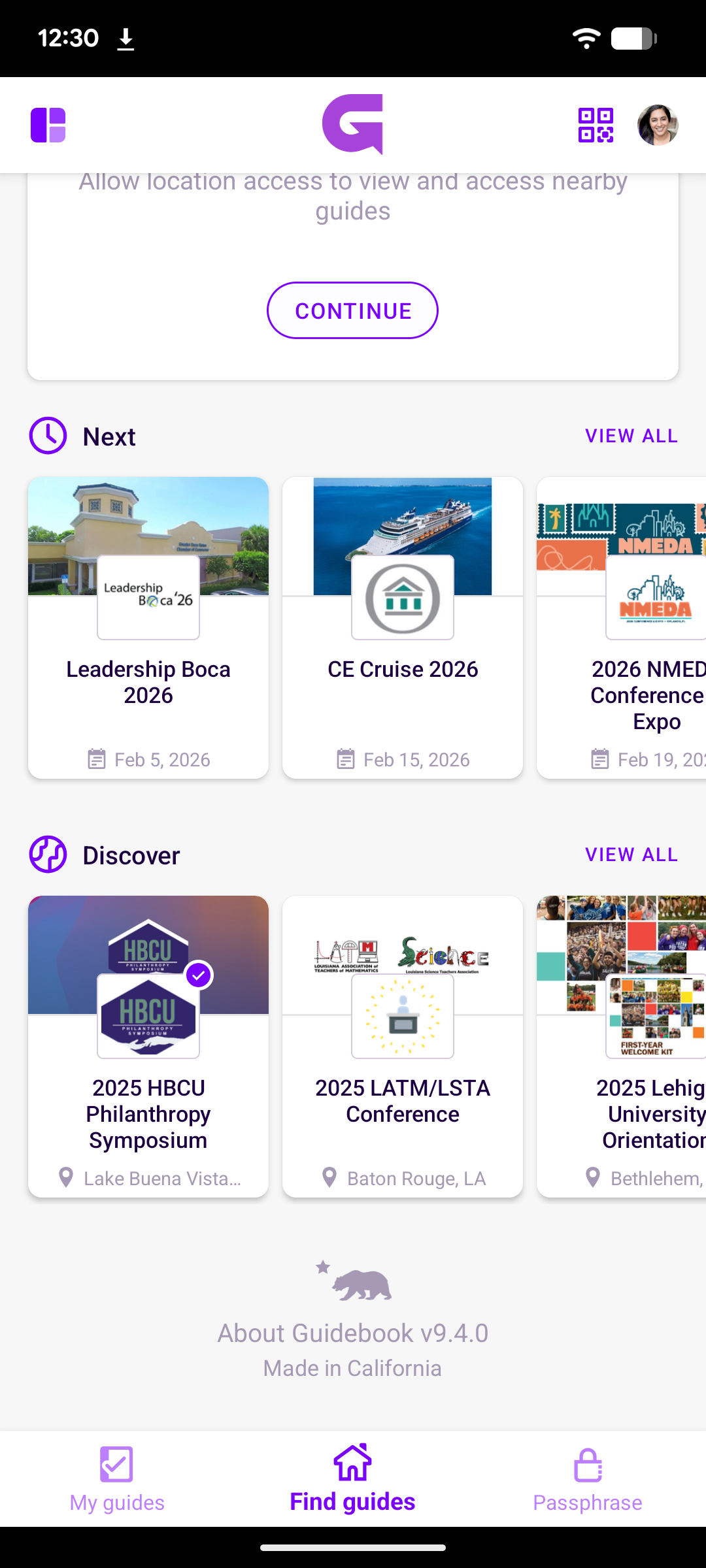
Before
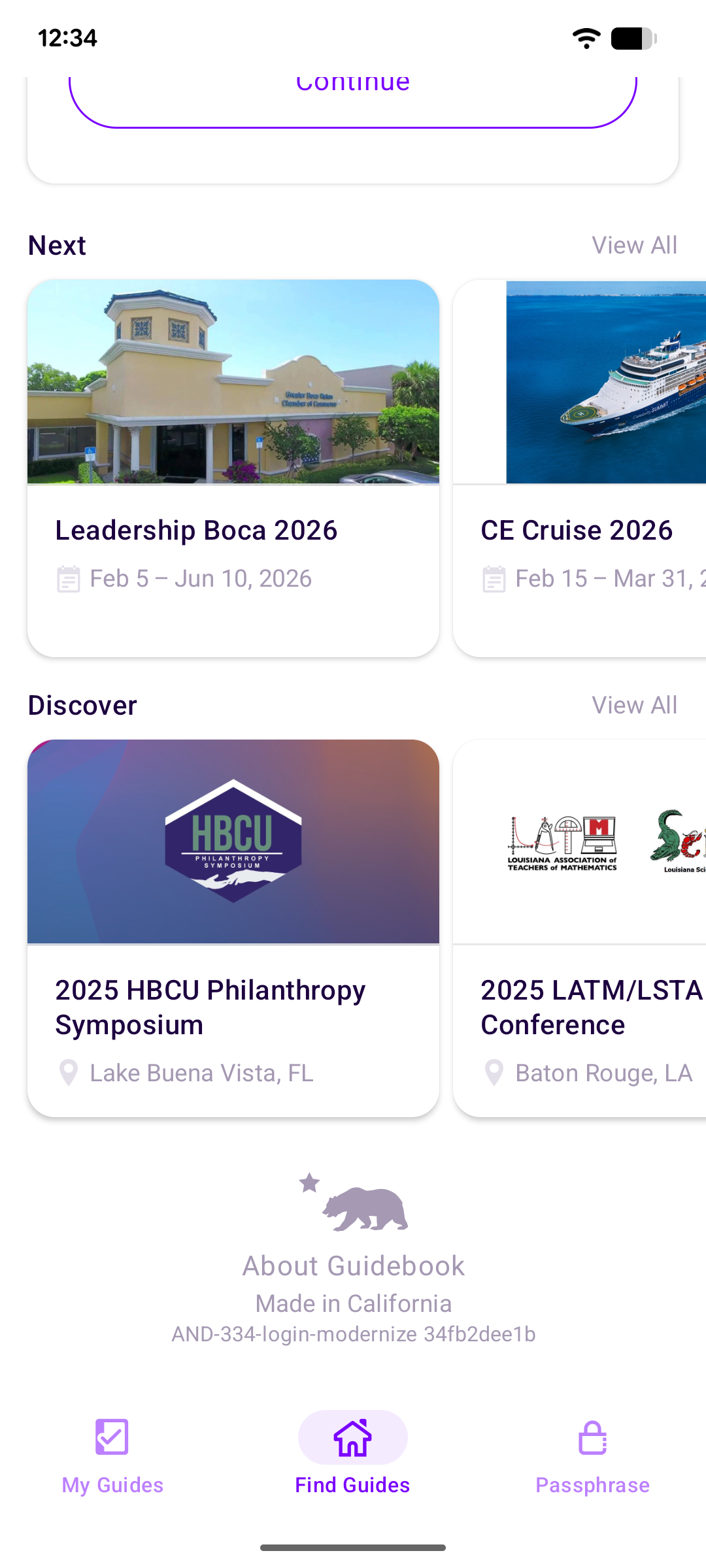
After
Here, you'll notice that:
- Guide cards have been resized and redesigned to show information in a more scannable, clean format.
- Section header icons have been removed
- The Featured Guide display has been streamlined (less visual noise, more clarity).
- Search has also been simplified to focus within the current Space only, making results faster and more relevant.
Passphrase Tab
This is a small but clean update that involved refreshing on-screen copy and changing the positioning so it’s left-aligned.
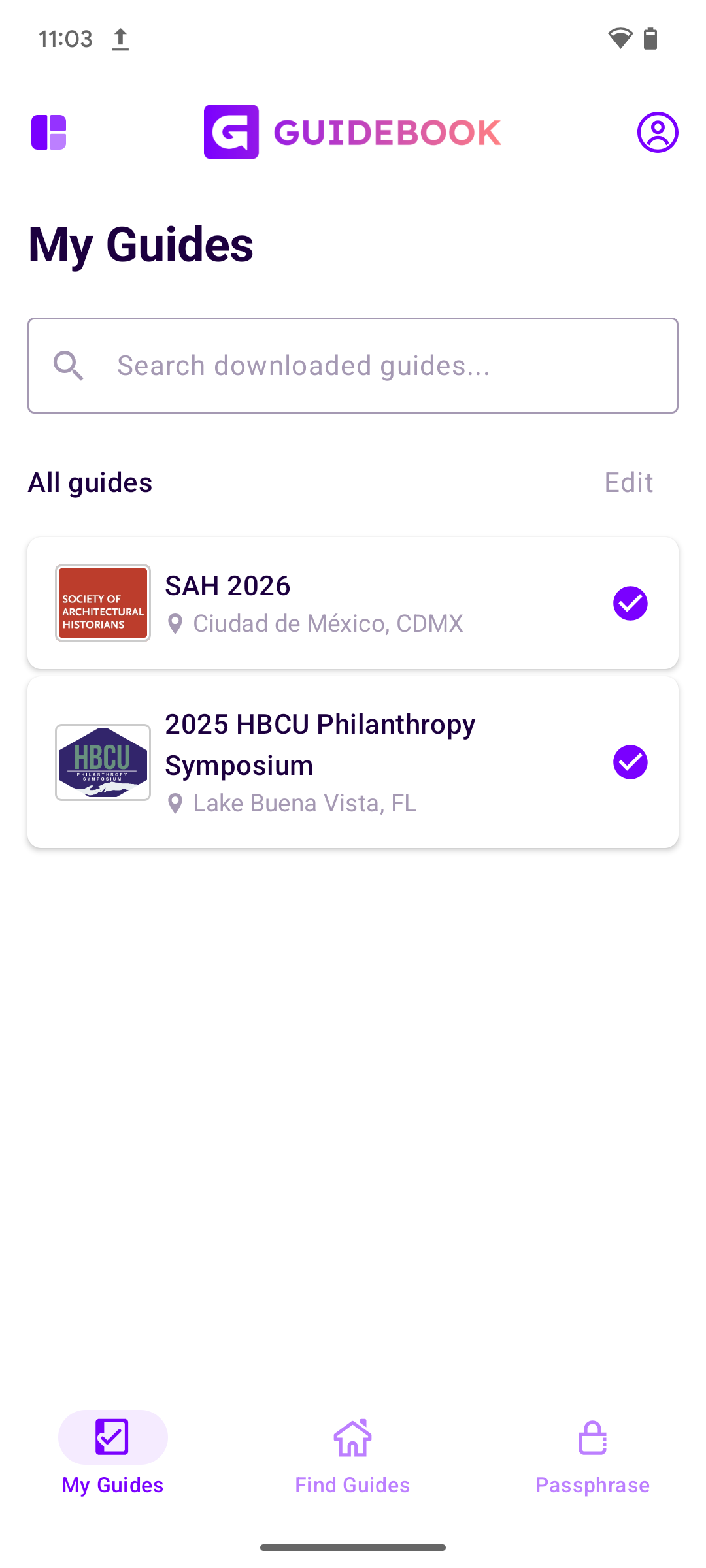
My Guides Tab
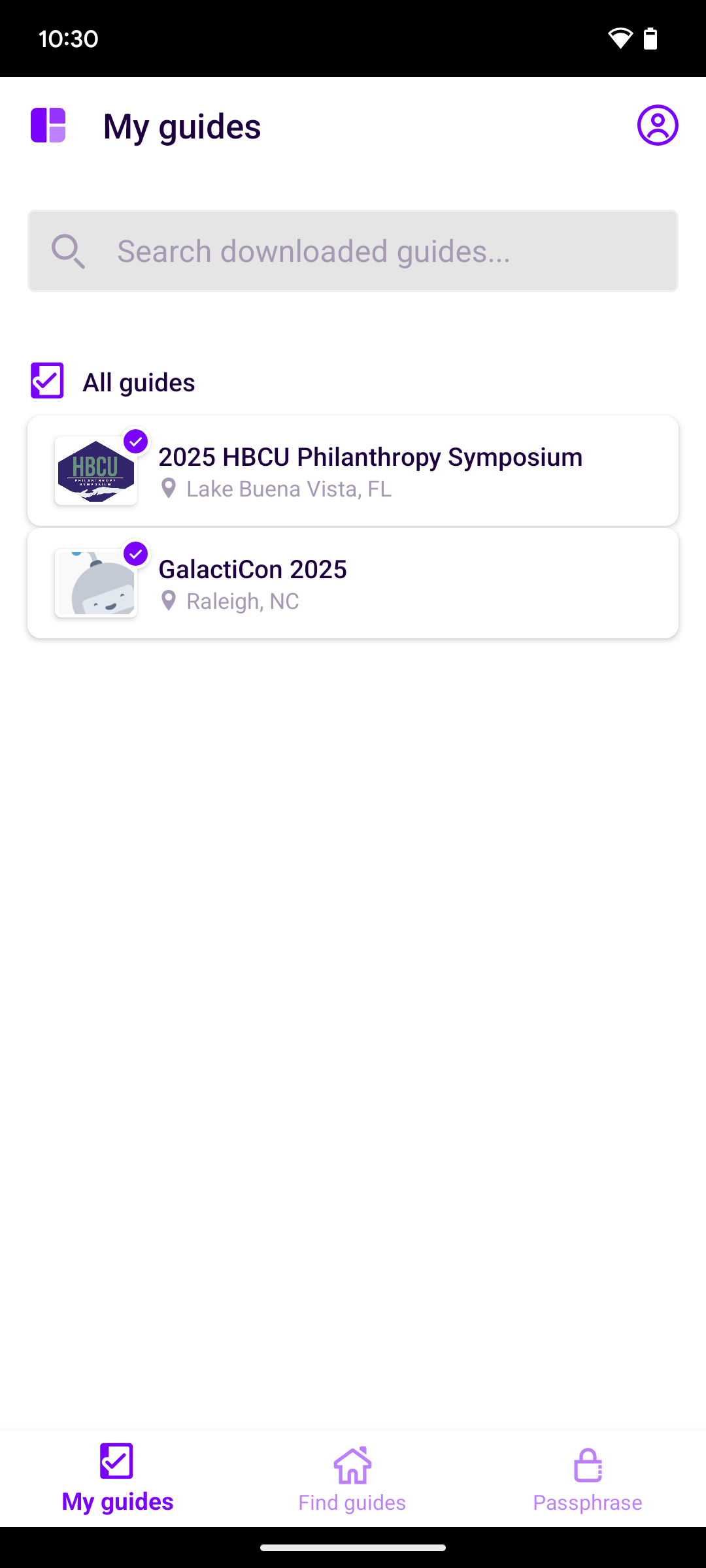
Before
After

After
There are two key improvements here:
- The checkmark that indicates a downloaded guide has been repositioned away from the guide icon, resulting in a cleaner layout.
- Removing downloaded guides is now much easier via an Edit button. Previously, attendees had to long-press to remove a guide, which wasn't obvious to most users. The introduction of an Edit button makes the action clear and accessible.
Space Menu
Here are the noteworthy changes on this screen:
- The large banner that previously sat at the top of the menu has been removed.
- The title “Spaces” is now prominent, so that end users know exactly what the content on this screen is.
- The Spaces list now clearly shows the Space that is currently active. In addition, non-active spaces are listed alphanumerically for easy scanning.
- Search copy has also been cleaned up, removing unnecessary references that added clutter.
- Removing a Space is now much more straightforward (no more hunting for the gear icon or relying on a long-press to open the Settings view). All a user has to do now is tap Edit to access the remove option.
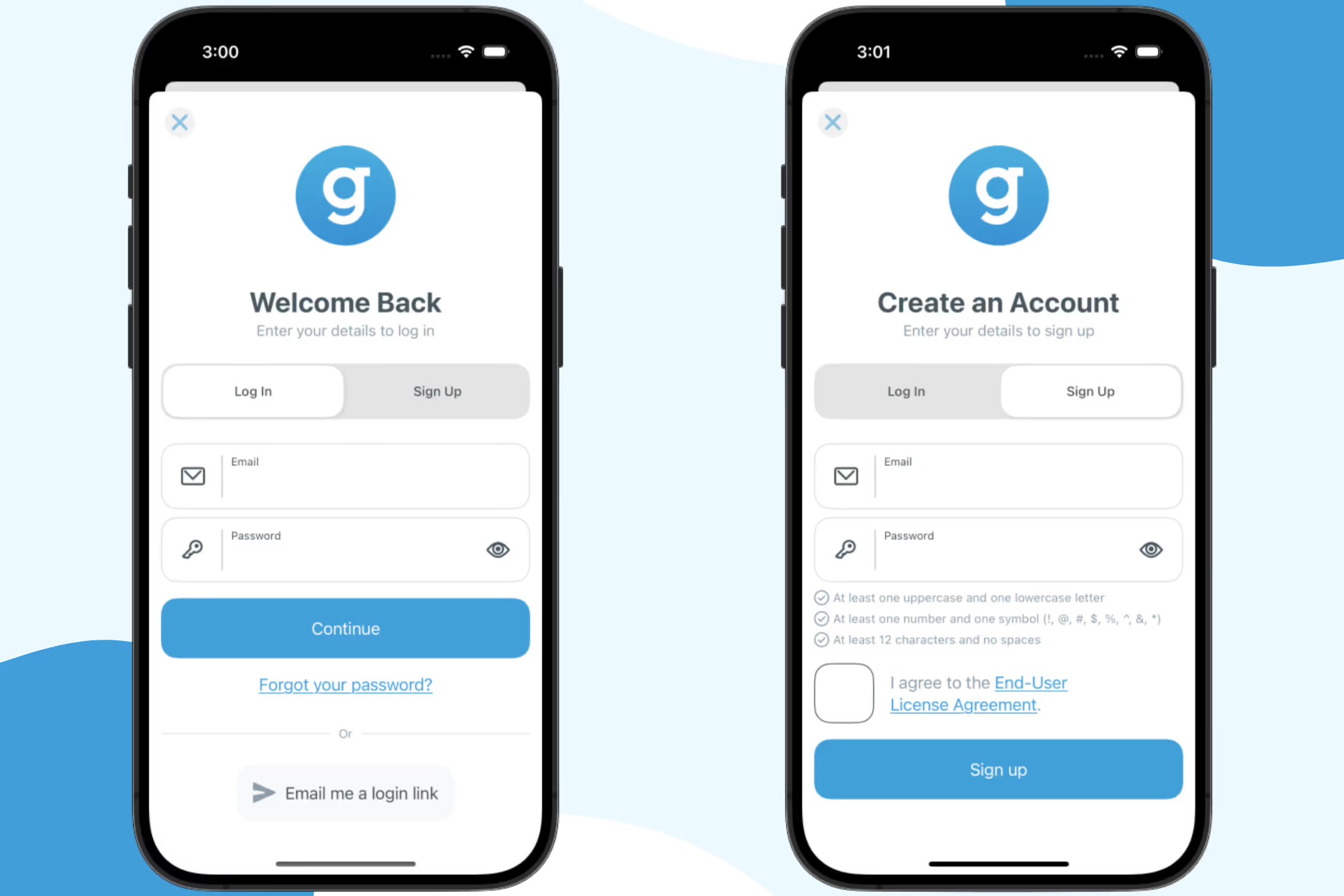
Login and Signup Screens
We've removed the space logo, icons, and boxes from these screens. The result is a cleaner, more modern layout that makes better use of screen space and feels more in line with today's design standards.
Profile: Password Change
Attendees creating or updating their password will now see the password requirements displayed clearly. This is a usability improvement that reduces confusion and friction for attendees.
This Is Just the Beginning
This first iteration of the App Refresh is the foundation. Throughout the rest of 2026, we'll be releasing nine more updates, each one building on the last.
Together, these enhancements will move the Guidebook app experience closer to the modern, polished product attendees and planners expect.
This work also connects to something we started earlier this year: a complete overhaul of Guidebook's Builder email templates. More than 100 email templates were rebuilt for better performance, responsive design, and consistent branding. The 2026 App Refresh is the next chapter of that same commitment to continuous improvement.
If you have any questions, feedback, or want to discuss updating your branded app, please reach out to our support team or your Account Manager.

Get the Mobile App Playbook
A short guide to running the whole student journey in one app. No fluff, just what works.
for higher ed
Campus
Playbook
A practical guide to building a connected campus experience.
Free playbook
The Mobile App Playbook for Universities
Students decide if they belong long before they set foot on campus. This playbook shows how to win them over from the first visit through graduation.
- Grow enrollment and boost recruitment
- Increase belonging and retention
- Run every event from one branded app
By submitting, you agree to our Privacy Policy.
You're in.
.png)