Campus apps by department
Admissions, orientation, student life, and more — one campus app that works across departments.

Campus apps by department
Admissions, orientation, student life, and more — one campus app that works across departments.
Build unlimited event apps on one license
One partnership for unlimited campus events — orientation, tours, student life, and everything in between.
Build unlimited event apps on one license
One partnership for unlimited campus events — orientation, tours, student life, and everything in between.
Compare event app platforms
See how Guidebook stacks up against other event app and registration platforms.
Compare event app platforms
See how Guidebook stacks up against other event app and registration platforms.
Event apps for nonprofit and community programs
Give members, volunteers, and donors one branded app for conferences, fundraisers, and year-round community.
Event apps for nonprofit and community programs
Give members, volunteers, and donors one branded app for conferences, fundraisers, and year-round community.
Campus integrations and an open API
Connect Guidebook with the campus systems, APIs, and tools your team already uses.
Campus integrations and an open API
Connect Guidebook with the campus systems, APIs, and tools your team already uses.
Event apps for corporate and enterprise teams
Internal meetings, offsites, and large-scale corporate events — with the branding and control enterprise teams need.
Event apps for corporate and enterprise teams
Internal meetings, offsites, and large-scale corporate events — with the branding and control enterprise teams need.
Create a branded event app with no coding
Put schedules, maps, resources, and updates in every attendee's pocket — built for campus events and programs.
Create a branded event app with no coding
Put schedules, maps, resources, and updates in every attendee's pocket — built for campus events and programs.
Launch a branded, white-label event app
A white-label event app with your branding, your content, and your attendee experience — no coding required.
Launch a branded, white-label event app
A white-label event app with your branding, your content, and your attendee experience — no coding required.
Everything in the Guidebook platform
Explore the features event teams use to engage attendees before, during, and after the event.
Everything in the Guidebook platform
Explore the features event teams use to engage attendees before, during, and after the event.
One app for in-person and virtual attendees
The same schedule, networking, and updates whether people are in the room or joining remotely.
One app for in-person and virtual attendees
The same schedule, networking, and updates whether people are in the room or joining remotely.
Event apps built for associations
Annual meetings, chapter events, and member engagement — without rebuilding a new app every year.
Event apps built for associations
Annual meetings, chapter events, and member engagement — without rebuilding a new app every year.
A branded event website that matches the app
Promote the event, collect interest, and keep branding consistent from the first click to check-in.
A branded event website that matches the app
Promote the event, collect interest, and keep branding consistent from the first click to check-in.
Plan, run, and measure events on one platform
App, registration, badges, and websites in one workflow — so planning isn't a pile of disconnected tools.
Plan, run, and measure events on one platform
App, registration, badges, and websites in one workflow — so planning isn't a pile of disconnected tools.
Keep members engaged between events
One branded app for the conference and everything that happens the other 51 weeks of the year.
Keep members engaged between events
One branded app for the conference and everything that happens the other 51 weeks of the year.
The conference app attendees actually use
Schedules, maps, networking, and live updates for annual meetings, summits, and multi-day conferences.
The conference app attendees actually use
Schedules, maps, networking, and live updates for annual meetings, summits, and multi-day conferences.
Registration that feeds your app and badges
Collect registrations, payments, and attendee data in the same platform as your event app.
Registration that feeds your app and badges
Collect registrations, payments, and attendee data in the same platform as your event app.
Design and print event badges in one place
Custom badges, QR check-in, and on-site printing — without a separate badge vendor.
Design and print event badges in one place
Custom badges, QR check-in, and on-site printing — without a separate badge vendor.
A Smaller School?
Deliver a polished, branded event experience without a large team or a big budget.

A Smaller School?
Deliver a polished, branded event experience without a large team or a big budget.
Running Family Programs?
Give families everything they need, from schedules and maps to real-time updates, all in one place.

Running Family Programs?
Give families everything they need, from schedules and maps to real-time updates, all in one place.
Coordinating Move-In Day?
Share updates, manage events, and keep students informed from move-in through the academic year.

Coordinating Move-In Day?
Share updates, manage events, and keep students informed from move-in through the academic year.
Offering Campus Tours?
Deliver branded, self-guided tour experiences with interactive maps and rich media, available 24/7.

Offering Campus Tours?
Deliver branded, self-guided tour experiences with interactive maps and rich media, available 24/7.
Organising a Career Fair?
Simplify logistics for students, employers, and Career Services staff with one easy-to-use app.

Organising a Career Fair?
Simplify logistics for students, employers, and Career Services staff with one easy-to-use app.
Managing Alumni Events?
Plan reunions, regional events, and fundraising campaigns with an app built for alumni engagement.

Managing Alumni Events?
Plan reunions, regional events, and fundraising campaigns with an app built for alumni engagement.
Boost Student Engagement
One hub for schedules, resources, and events that keeps students connected throughout the academic year.

Boost Student Engagement
One hub for schedules, resources, and events that keeps students connected throughout the academic year.
Planning Orientation?
Help new students feel prepared from day one with schedules, campus resources, and real-time updates in one app.

Planning Orientation?
Help new students feel prepared from day one with schedules, campus resources, and real-time updates in one app.
Running Admissions Events?
Manage open houses, tours, and yield events with a branded app that saves time and engages prospective students.

Running Admissions Events?
Manage open houses, tours, and yield events with a branded app that saves time and engages prospective students.
Get a custom Sponsorship Package Template
Stop starting from scratch. Grab free templates that helWe'll build a tailored sponsorship package with suggested pricing, tiers, and benefits..for your specific event.p you build professional sponsorship packages and close deals faster.

Get a custom Sponsorship Package Template
Stop starting from scratch. Grab free templates that helWe'll build a tailored sponsorship package with suggested pricing, tiers, and benefits..for your specific event.p you build professional sponsorship packages and close deals faster.
Plan Your Next Event Without Missing a Beat.
From venue selection to post-event wrap-up, this free checklist walks you through every step (so nothing falls through the cracks).
.avif)
Plan Your Next Event Without Missing a Beat.
From venue selection to post-event wrap-up, this free checklist walks you through every step (so nothing falls through the cracks).
Real Results From Real Events
100,000+ organizations trust Guidebook. See exactly how universities, associations, enterprises, and more put it to work.

Real Results From Real Events
100,000+ organizations trust Guidebook. See exactly how universities, associations, enterprises, and more put it to work.
Flexible pricing for every event size
Find the perfect plan for your needs, from intimate gatherings to large-scale conferences.

Flexible pricing for every event size
Find the perfect plan for your needs, from intimate gatherings to large-scale conferences.
Join our event experts
Watch on-demand webinars and join live sessions with industry leaders sharing best practices for event success.
.avif)
Join our event experts
Watch on-demand webinars and join live sessions with industry leaders sharing best practices for event success.
Guidebook in Action
Book a personalized walkthrough and discover how we help event teams create better attendee experiences.
Guidebook in Action
Book a personalized walkthrough and discover how we help event teams create better attendee experiences.
Event Technology on Any Budget: Smart Tech Tools for Small, Mid-Size & Large Events





Event Technology on Any Budget: Smart Tech Tools for Small, Mid-Size & Large Events
Planning your event tech stack can feel overwhelming, especially when budgets are tight.
Emerging event technologies can elevate attendee engagement, streamline operations and provide valuable data—but how do you decide what’s realistic for your budget?
We spoke with vendors and experts who support events of all sizes to uncover the most effective technology options at every price point. Whether you’re hosting a small community event or a large-scale conference, here’s where to allocate your event budget for maximum ROI on tech.
1. Small Event Budget
Is money tight? More than 83% of Guidebook's event app users say it's difficult to fight for new tech tools while event budgeting, so you're not alone. But a small budget doesn't prevent you from using high-tech tools to increase attendee satisfaction, gather valuable data, and position yourself as tech-forward.
Audio/Visual
You don't need a big event budget to amplify sound, but you'll need to keep it simple. Rent serviceable monitors, a mixer, microphones and speakers for about $400/day from your local camera shop.
Registration
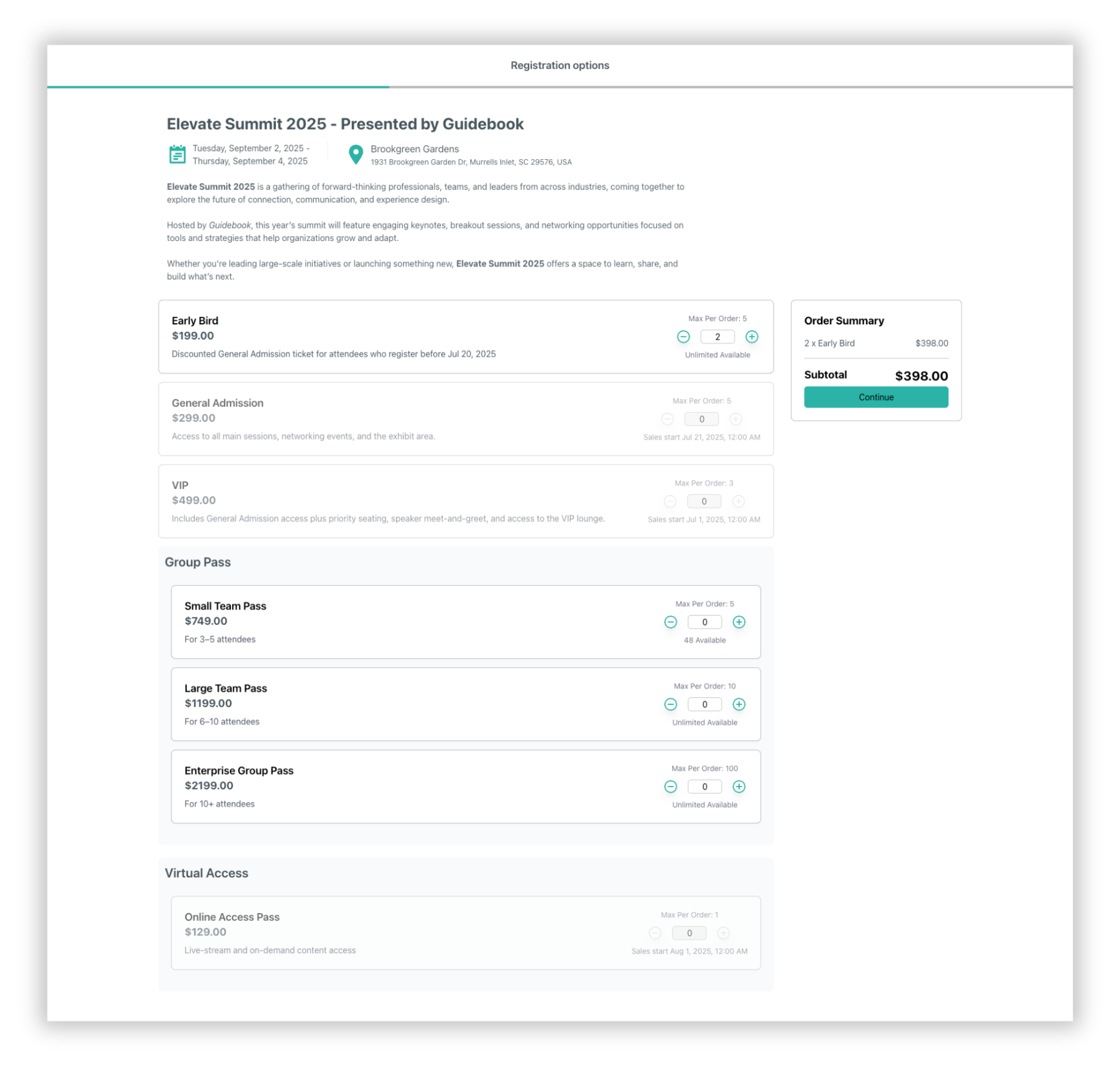
With Guidebook, you can easily manage registration for free and paid events from one event management platform.
Guidebook's drag-n-drop interface gives you user-friendly tools to setup a branded registration flow, as well as:
- create multiple tickets
- organize tickets into groups (such as VIP, Early Bird and more)
- offer discount codes to drive signups
- connect your registration flow to your event website
In addition, Guidebook Registration is always free for free events, with no surprise or hidden fees.
Learn more about Guidebook's latest registration updates.
Projector and screen
Help your attendees feel connected by projecting a live feed of social media mentions, photos or news–without breaking the bank. If you can't snag a projector from your office, you can rent a decent one for $40/day.
Handheld tech
"If you're looking to give a presentation an interactive feel," says Ashton Arnold from Meeting Tomorrow, "rent enough iPads for each table to have one at the keynote speech." Meeting Tomorrow offers tech rentals for events of all sizes. According to Ashton, it's a low-cost way to push a presentation through to each table, and to allow for polling or other interactions.
Mobile event app

Small event? You can build a fully working mobile event app for free, and give your attendees access to up-to-the-minute paperless schedules, maps, social media, networking and more. Get started now!
2. Mid-Range Event Budget
At this level you can afford a solid version of the most effective tech tools. It means while you may not invest in things that are superfluous or 'just for show', you've invested in sound, visuals, registration and tech amenities to enrich your attendees' experience.
LCD video projectors
Your tech event budgeting can easily include projectors for showing presentations, pre-recorded video or live feeds from Twitter or a photo stream. Hire a technician to handle live-switching from different sources.
Why is this important? A video switching/scaling system is necessary for creating a seamless experience when different video sources haven't been created at the same resolution or speed, and a production technician will be responsible for using it correctly.
Single camera live recording/projection
If you're recording the keynote speech, action in the game room, or b-roll footage for a teaser video in advance of the next event, you may choose to hire a videographer for some single-camera action. For anything that requires sound you'll need a microphone. If you're recording an amplified speech, your videographer will want to get a feed from the house mixer for the cleanest sound or set up a separate microphone.
Whatever you choose, allocating event budget to hire a professional videographer is your best bet. There's a huge difference between video that's watchable and video that's... inexpert. It's kind of like how it's famously inadvisable to hire your cousin to shoot your wedding, you know?
Video wall

An event productions company like Meeting Tomorrow can help install and program a 5x5 iPad video wall for a mid-price "smart wall" feel. We were able to find quotes in the $2K/day range for these dynamic installations.
3. Large Event Budget
When your event budgeting plan has a few more zeroes attached, you can afford to explore cutting-edge, crowd-wowing tech installations, tools that memorably streamline the experience, and a fully branded multi-sensory atmosphere.
Multiple camera live recording/projection
If you've ever seen a recorded Ted talk, you know what a multi-camera shoot looks like. You'll need more than one camera operator, and a production technician if you want to mix the multiple cameras live on a big screen.
RFID technology
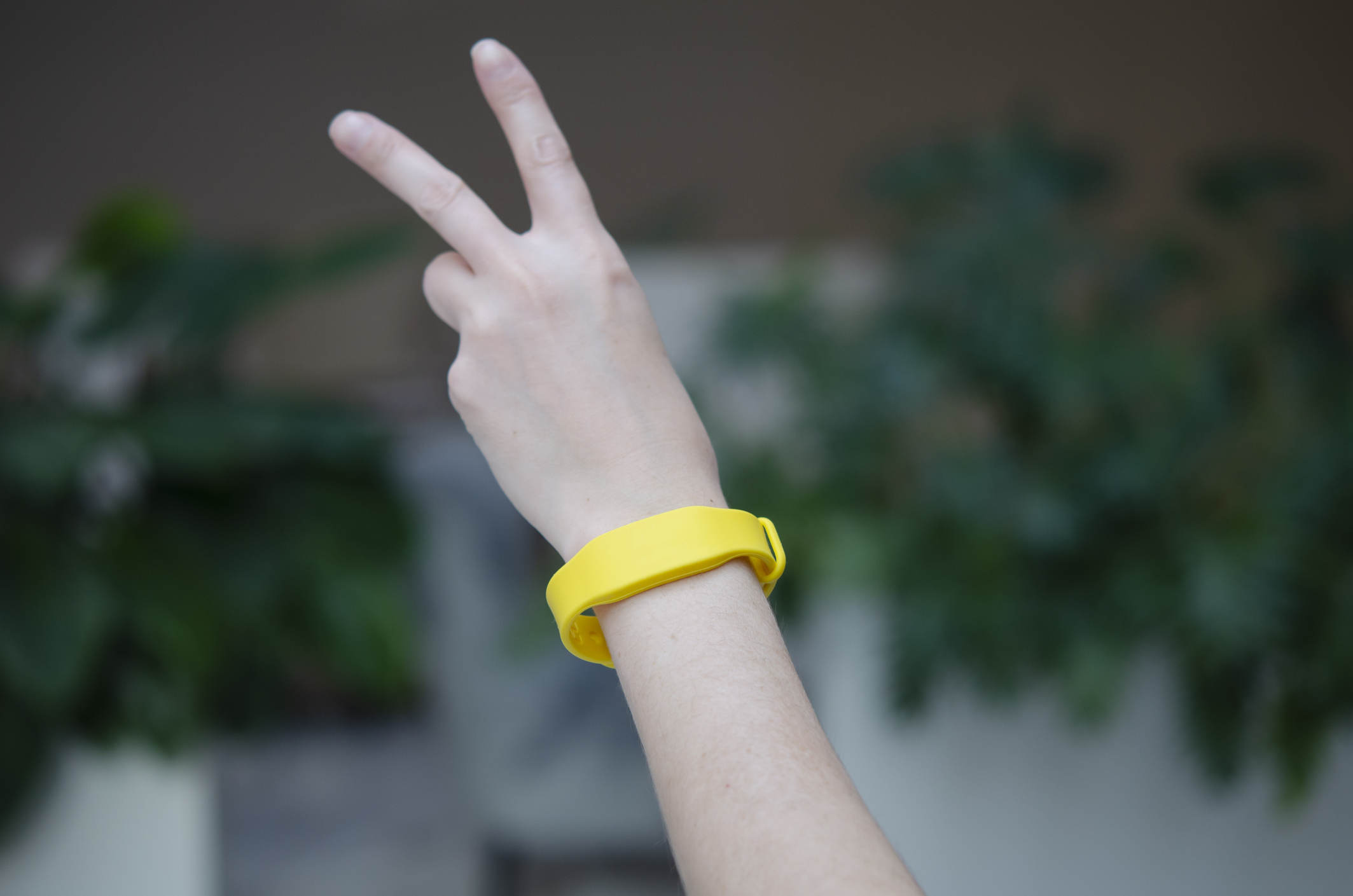
With more event budget to play with, you can take advantage of engagement and measurement features like RFID wristbands. These chip-embedded bracelets serve to grant entry to an event and allow an attendee to interact with attractions, make purchases, and share contact info.
From an organizer's point of view, RFID technology can generate valuable data about how attendees move throughout the space and experience the event, can act as security (granting access to VIP areas only for certain ticketholders).
Analyzing attendee behaviors can be immensely valuable–this is the kind of big data marketers have been using to track behaviors on websites for years.
Suppliers will often provide bracelets, RFID chips, and the technology needed to use them. While prices vary based on event size and the supplier, expect your investment to be about $20/attendee on the low end.
Now that your event budget is all figured out, how about getting started on that event mobile app?
Get started here or request a demo to speak with one of our dedicated product experts!

Get the Mobile App Playbook
A short guide to running the whole student journey in one app. No fluff, just what works.
for higher ed
Campus
Playbook
A practical guide to building a connected campus experience.
Free playbook
The Mobile App Playbook for Universities
Students decide if they belong long before they set foot on campus. This playbook shows how to win them over from the first visit through graduation.
- Grow enrollment and boost recruitment
- Increase belonging and retention
- Run every event from one branded app
By submitting, you agree to our Privacy Policy.
You're in.
.png)

.avif)